
You matched. The conversation is going well. They ask for your number to move to WhatsApp or to call. And here is where most people make a mistake that is very difficult to undo.
Dating app phone privacy is something most people think about only after something goes wrong. By that point, your real number is already out – and getting it back is impossible.
Sharing your real phone number with a dating match feels like a natural next step. But it hands a stranger something permanently linked to your identity – your location, your social profiles, your financial accounts. And once it is out, you cannot take it back.
The good news is there is a better way. A private call link lets you move to real voice calls without your number ever changing hands. Here is how – and why it matters more than most people realize.
Dating App Phone Privacy – Why Sharing Your Number Is the Real Risk
Dating apps have built-in safety features – unmatching, reporting, blocking. The moment you move off the app and share your phone number, every single one of those protections disappears.
Dating app phone privacy begins the moment you decide what contact information to share – not after something goes wrong. Once your number is out, no app feature can protect you.
The stories below are from real people on Reddit and Twitter. They are more common than most people admit.
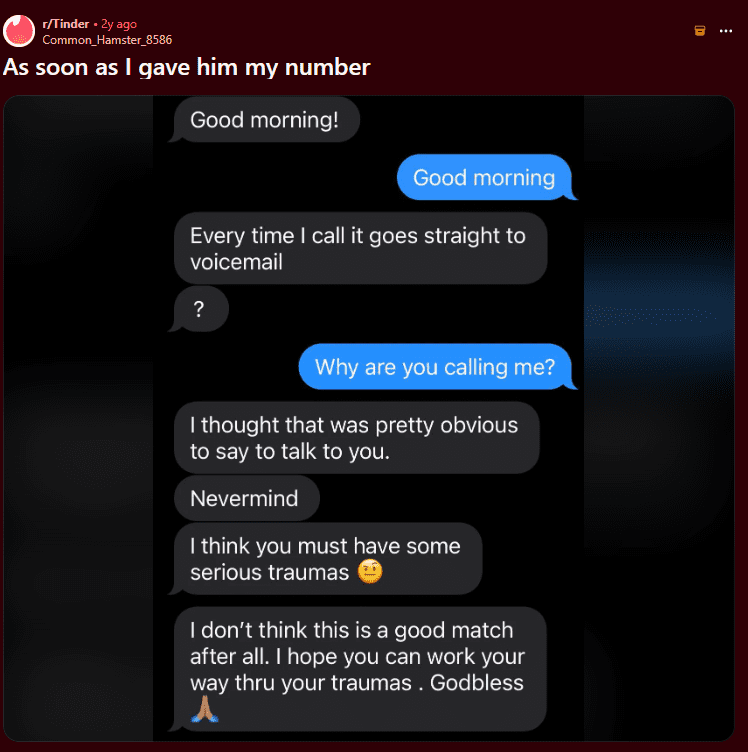
This person did everything right – they were polite, they said they were not a match, they tried to end things cleanly. None of it worked. Because he had their number. Mismatching on Tinder means nothing when someone already has a direct line to your phone.
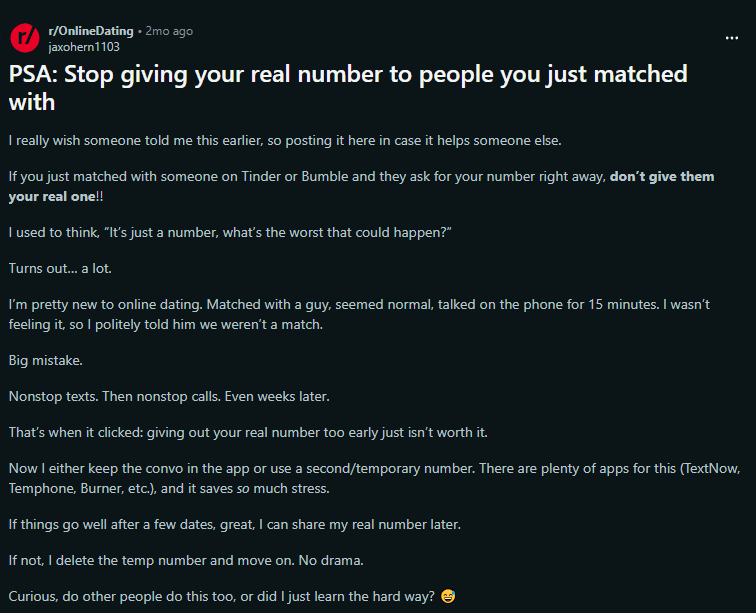
This post struck a nerve because so many people have been through exactly the same thing. A 15-minute call. A polite rejection. Then nonstop texts and calls for weeks. The comment section on this post had hundreds of replies from people sharing identical experiences.
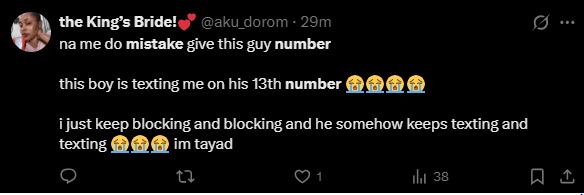
This is the worst case scenario – and it happens. Blocking one number does nothing when someone creates a new one. This situation becomes possible the moment you share your real number. Without your number, it cannot happen at all.
The pattern across all three is identical. Everything was fine until the number was shared. That single moment changed everything. CallaLink is built to make that moment unnecessary.
How CallaLink Solves Dating App Phone Privacy – App Features Explained
Before we walk through the dating use case, here is a quick overview of how CallaLink works so the rest makes complete sense.
CallaLink has two types of links:
- Event Link – A group link you share publicly. People who click it see your available time slots and request a slot. You approve or decline. Think of it as a public-facing scheduling gateway.
- Private Call Link – A unique one-to-one link created at the time you sign up. When someone taps this link or scans your QR code, the call connects directly to your phone as a real GSM call – the same network your normal phone calls use. This is your personal private call link – one per account, always yours.
CallaLink also has two calling modes:
- Unrestricted Mode – Works like a normal dialer. All calls come through. Your number may be visible. Use this when you want standard calling behaviour.
- CallaLink Mode – This is the privacy mode. Only calls from people inside your schedule OR saved in your phone’s contact book come through. Everything else is automatically blocked. Call logs are also auto-deleted after each call so the caller never gets your number from their call history.
Important – Every Call on CallaLink is a Real GSM Call
This is what makes CallaLink completely different from apps like Google Voice, TextNow, Burner, or any VOIP-based solution.
VOIP apps route calls through the internet – call quality drops, calls fail on weak connections, and the other person often knows something feels off about the call quality.
CallaLink uses your real GSM network – the same infrastructure your normal phone calls use. The person calling you experiences a completely normal phone call. No delays. No robotic voice. No dropped quality. They have no idea a privacy layer even exists. They simply called a link and got connected to you – perfectly, privately, on a real network call.
The CallaLink Dating Workflow – Step by Step
STEP 1: Post Your Event Link in Your Dating Profile
The first rule of dating app phone privacy is simple – never post your number anywhere publicly. Instead, create an event link inside CallaLink and give it a name – for example, “Dating Calls.” Attach a schedule to it – say, weekday evenings 7 PM to 10 PM, or Saturday afternoons.
Post this event link in your Tinder, Bumble, or Hinge bio: “Prefer to voice call first? Book a time here: [your event link]”
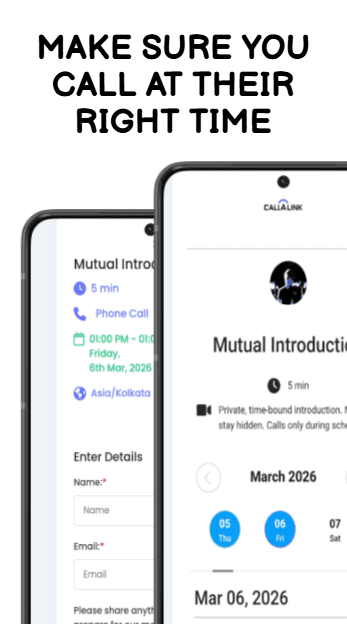
When a match clicks the link, they see your available time slots and request one. You review the request and decide whether to approve. No number shared. No direct access. You are in complete control of who gets through and when.
STEP 2: If You Like Them, Share Your Private Call Link
Once you have spoken through the scheduled slot and feel comfortable, you can share your private call link for direct access. This is the link they use to call a link directly connected to your phone.
Share it in chat: “Here is my call link — callalink.com/yourname. Works like a regular call. No app needed on your end.”
When they tap it – or scan your QR code using the CallaLink scanner – the call connects to your real phone as a normal GSM call. Not VOIP. Not internet-based. A real network call – crystal clear quality, works on any phone. Your number is never part of the exchange at any point.
STEP 3: Calls Are Automatically Managed by Your Schedule
In CallaLink mode, your phone only rings for calls that are:
- Inside the schedule you set
- OR from numbers saved in your phone’s contact book
Any call outside your schedule – including the person you just gave your private call link to – is automatically blocked until their time slot opens. No manual action needed from you.
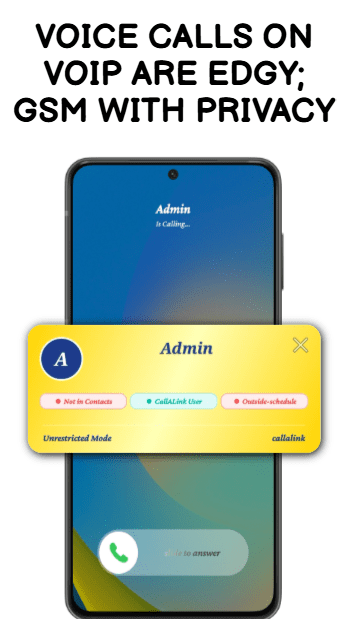
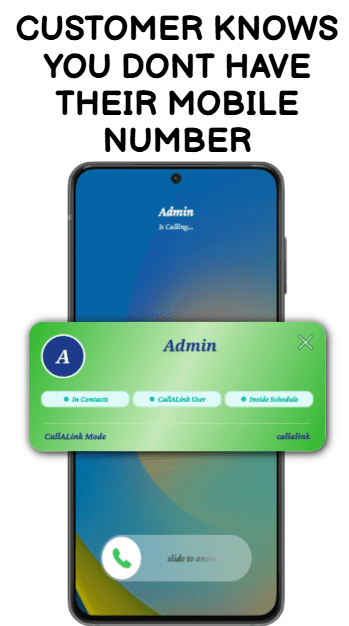
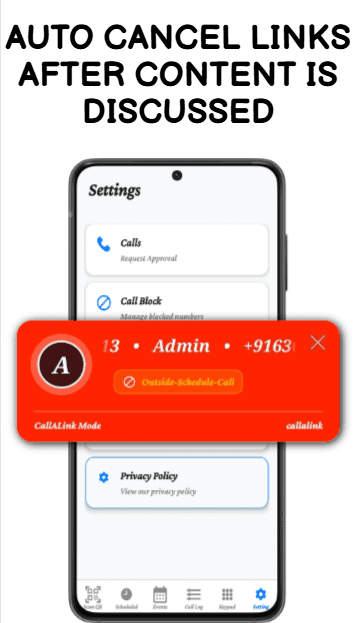
You also see a color-coded caller popup on every call:
- Green popup – CallaLink mode
- Yellow popup – Unrestricted mode
- Red popup – Blocked call (outside schedule or manually blocked)
STEP 4: End Access Cleanly at Any Point
If things do not work out – or if behaviour becomes a concern – you have multiple layers of protection:
Layer 1 – Delete the event link from your dashboard.
Anyone who had that link can no longer use it. It becomes permanently useless the moment you delete it.
Layer 2 – Switch to CallaLink mode.
Even if they already have your private call link, calls are blocked automatically unless you have saved their number in your phone contacts or their slot is scheduled.
Layer 3 – Auto deleted call logs.
After every call in CallaLink mode, the entry is automatically removed from phone’s call log. Even if they look at the call log on their own phone, your number does not appear there.
Layer 4 – Permanent manual block.
You can manually block any number permanently inside Callalink. Once blocked, the red popup appears and the call never connects.
The result is that even in the absolute worst case scenario – where someone has both your event link and your private call link – they still cannot reach you without your permission in CallaLink mode.
How CallaLink Fixes Each Dating App Phone Privacy Problem
Each of the three screenshots above shows a different dating app phone privacy failure. Here is exactly how CallaLink prevents each one
Screenshot 1 – The person who got called immediately after sharing their number. With CallaLink, only an event link goes in the bio. The match can request a slot. Outside that slot, calls are blocked automatically. No unexpected calls. Ever.
Screenshot 2 – The person who got weeks of nonstop calls after one 15-minute conversation. With CallaLink, delete the event link after that call. Switch to CallaLink mode. Their number is not in contacts. Auto-blocked from that point. No drama. No stress.
Screenshot 3 – The person being contacted from 13 different numbers. This situation requires your number. Without your number, creating new numbers does nothing. With CallaLink, they never had your number to begin with. 13 new numbers still cannot call you in CallaLink mode unless they are in your schedule or contacts.
CallaLink does not just reduce risk. It removes the conditions that make these situations possible in the first place.
Where to Put Your Event Link on Dating Apps
Protecting your dating app phone privacy across all platforms is simple once you have your CallaLink event link ready:
- Bumble bio: “Book a call – [event link]”
- Tinder bio: “Voice call first? [event link]”
- Hinge prompt: “The way to reach me – [event link]”
- OkCupid contact section: paste event link directly
- In any chat: “Here is my call link if you want to talk – no number needed”
Dating App Phone Privacy – CallaLink vs Google Voice vs Burner
Most people who want dating app privacy end up trying one of three options – Google Voice, Burner, or a second SIM. Here is why none of them solve the actual problem.
| Feature | CallaLink | Google Voice | Burner App |
| Real GSM call (not VOIP) | ✅ | ❌ | ❌ |
| Your number never shared | ✅ | ❌ | ❌ |
| Share a link instead | ✅ | ❌ | ❌ |
| Caller scheduling | ✅ | ❌ | ❌ |
| Auto-block outside schedule | ✅ | ❌ | ❌ |
| Caller approval system | ✅ | ❌ | ❌ |
| Auto-delete call logs | ✅ | ❌ | ❌ |
Google Voice gives you a second number – but it is still a number. You are still sharing something that can be called anytime, from anywhere, with no control over who gets through or when. There is no scheduling, no approval system, no auto-blocking. You just have a different number to worry about instead of your real one.
Burner gives you a temporary number you can delete – but again, it is a number. The person you give it to can call it anytime until you burn it. Calls go over VOIP so quality is inconsistent. And once you burn the number, you lose the entire communication history with that contact – including people you actually liked.
CallaLink does not give you a second number at all. You share a private call link or QR code. There is no number to give out, no number to burn, and no number to worry about. The call connects over real GSM so quality is identical to a normal phone call. And your scheduling and approval system means the right people reach you at the right time – automatically.
Dating app phone privacy does not require a workaround or a second number. It requires a system built for this problem from the ground up – and that is exactly what CallaLink is.
For a complete guide to protecting your number across all platforms where you currently share it:
Read next: How to Receive Calls Without Sharing Your Phone Number
→ callalink.com/blog/receive-calls-without-sharing-your-phone-number
Frequently Asked Questions
Does the other person need to install CallaLink to call a link?
Yes. With CallaLink, callers use your private call link to connect to your mobile. Your real phone number is never displayed – before, during, or after the call. The call itself connects via a standard GSM line, so quality is identical to a regular mobile call. This is the simplest way to receive calls without sharing your number to anyone.
What is the difference between an event link and a private call link?
An event link is a public scheduling gateway – you post it in your bio and matches use it to request time slots. A private call link is a direct one-to-one link to your phone. In dating, you share the event link first and only share your private call link once you are comfortable with someone.
Can they get my number if I use CallaLink?
No. Your number is never shared through any link or QR code. In CallaLink mode, call logs are also automatically deleted after every call – so your number does not appear in their call history.
What if they already have my private call link and I want to stop them?
Switch to CallaLink mode. In CallaLink mode, calls are blocked automatically unless the caller is in your schedule or saved in your phone’s contact book. You can also manually block them permanently in the app.
Does CallaLink work with Tinder, Bumble, and Hinge?
Yes. Wherever you can share a URL – in a bio, in a chat, or in a message – you can share your CallaLink event link or private call link. No restrictions on which platform you use.
Is CallaLink the best solution for dating app phone privacy?
Yes – because it is the only solution that removes your number from the equation entirely. Other apps give you a second number. CallaLink gives you a link. Dating app phone privacy requires that your number never enters the conversation – and with CallaLink, it never does.
Read next: The Ultimate Guide to Phone Number Privacy – protecting your number across every context in daily life.
→ callalink.com/blog/phone-privacy-guide
Get Your Private Call Link – Keep Your Number Off Dating Apps
Replace your phone number with a private call link today.
Reachable. Private. Fully in control. Download on Android and iOS.