
Patients calling at midnight? Medical reps at lunch? The question every overworked doctor in India is asking right now is exactly this – how doctors can receive patient calls without sharing personal number and still stay fully reachable.
You finished a 12-hour shift. It is 11 PM. A patient’s family member is calling your personal number for the third time today – not because it is an emergency, but because they have your number and no reason not to use it.
If you are a doctor in India, you already know this problem. The moment you share your personal number with one patient, it passes to their family, their neighbour, and the cousin who “also has a small doubt.” Medical representatives call during consultations. Colleagues ping on WhatsApp during surgery. And there is no clean way out – because your number, once shared, cannot be taken back.
CallaLink changes this entirely. This guide walks through the 4 biggest call management problems doctors face every day – and exactly how how doctors can receive patient calls without sharing personal number at any stage.
Problem 1 – Patients Call at Any Hour. Not Just During Consultation
Your time is clinical. Protect it like one.
Doctors do not have a 9-to-5. But that does not mean every caller deserves access to you at every hour. The problem is not that patients call – the problem is that there is no system controlling when they can.
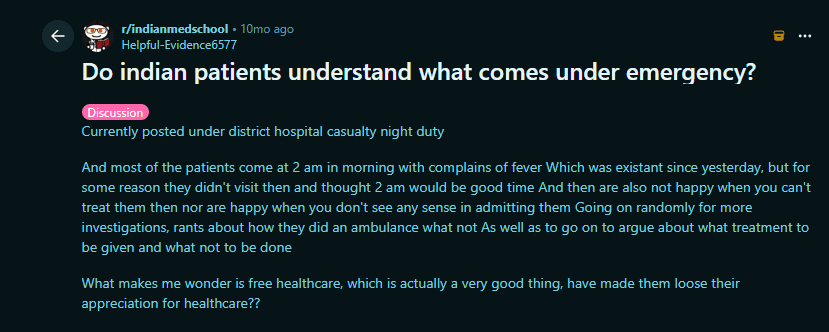
The post above is from a real doctor on Reddit India. It reflects what most Indian doctors experience privately but almost never say publicly.
This is the reality for most doctors in India. Patients do not distinguish between “I need help right now” and “I had a small doubt I forgot to ask at the clinic.” Both get the same call, to the same personal number, at whatever time the thought occurs to them.
The issue is not the patient – the issue is the absence of a system. When there is no structure, callers default to calling whenever it is convenient for them, not for you.
Solution 1 – How Doctors Can Receive Patient Calls Without Sharing Personal Number
CallaLink gives you a private call link – callalink.com/drname – that you share with patients instead of your number. Behind that link is a schedule you control entirely.
You set the hours you are available: morning OPD window, post-clinic evening, Saturday afternoon. Patients who click your link see only your available slots and submit a request. You approve or decline. The call connects at the agreed time – a real GSM call, not an internet call – and only within the schedule you have set.
Post your link wherever patients currently find your number:
“For follow-up queries, reach me here: [your call link]”
Outside your schedule, no call connects. Patients attempting to call see a message that you are unavailable – and your phone never rings. You are simply not reachable until you choose to be.
One link. Your schedule. Your terms.
Problem 2 – One Number Given to One Patient Reaches Everyone They Know
The number you share once never stays with one person.
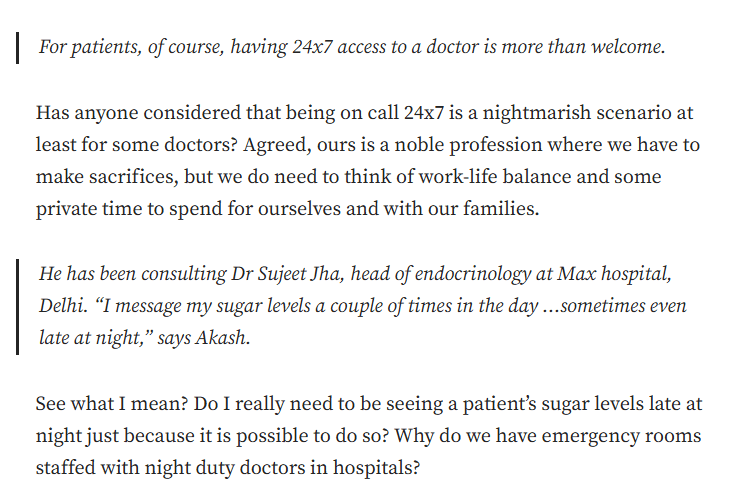
Dr. Vijay, a radiologist who writes on Medium about Indian healthcare, captured this problem exactly – describing a patient named Akash who messages his endocrinologist’s personal number with sugar levels “a couple of times a day… sometimes even late at night.” The doctor had not asked for this. He had not given permission for it. But once the number was shared, the boundary disappeared entirely.
This story describes the full chain every doctor recognises. One number shared for a legitimate follow-up. Then messages at midnight. Then the patient’s family starts calling. Then a neighbour who “was recommended by them.” You have never met these people. You did not give them your number. But they have it – and there is nothing you can do.
The platform keeps you accessible. That is exactly the problem.
How CallaLink Fixes This
With CallaLink, you never share your personal number at all. What you share is a private call link. The link is all anyone ever has. Your real number is invisible at every stage – before the call, during the call, and after the call ends.
CallaLink’s group system goes further. You can create separate links for separate caller types, each assigned to a different schedule:
- Patients get a link that connects during post-consultation hours only.
- Medical representatives get a link that opens on Friday at 5 PM only.
- Colleagues get a direct link that works during clinical hours.
- Patient families get a shared link restricted to weekday mornings.
Each group calls through their own link at their permitted time. No overlap. No interruptions. Anyone calling outside their schedule is auto-blocked – logged in red on your dashboard, never ringing your phone.
Your number is never shared. And even if it were – CallaLink mode blocks all unsaved numbers automatically. Nothing reaches you without your approval.
Problem 3 -Managing Calls Across Hospital, Clinic, and Private Practice
One doctor. Three roles. One phone ringing for all of them at once.
An IMA survey in 2022 found that 90% of doctors in India work more than 60 hours a week – with most expressing significant burnout and stress. That is not a workload problem alone. A large part of it is the communication chaos that comes with operating across multiple contexts with no separation between them.
“90% of Indian doctors work more than 60 hours per week, with a significant portion reporting burnout linked to constant accessibility demands.”
– IMA Physician Burnout Survey, 2022
Most senior doctors carry at least two roles – a hospital appointment, a private clinic, and often a teaching or consulting position. Each context has different callers, different urgency levels, and different acceptable calling hours. But all of them call the same personal number, at the same time, with no way for the doctor to know which context is calling until they pick up.
How CallaLink Fixes This
CallaLink lets you create any number of links – each with its own name, description, schedule, and group assignment.
Here is what a working doctor’s link structure looks like in CallaLink:
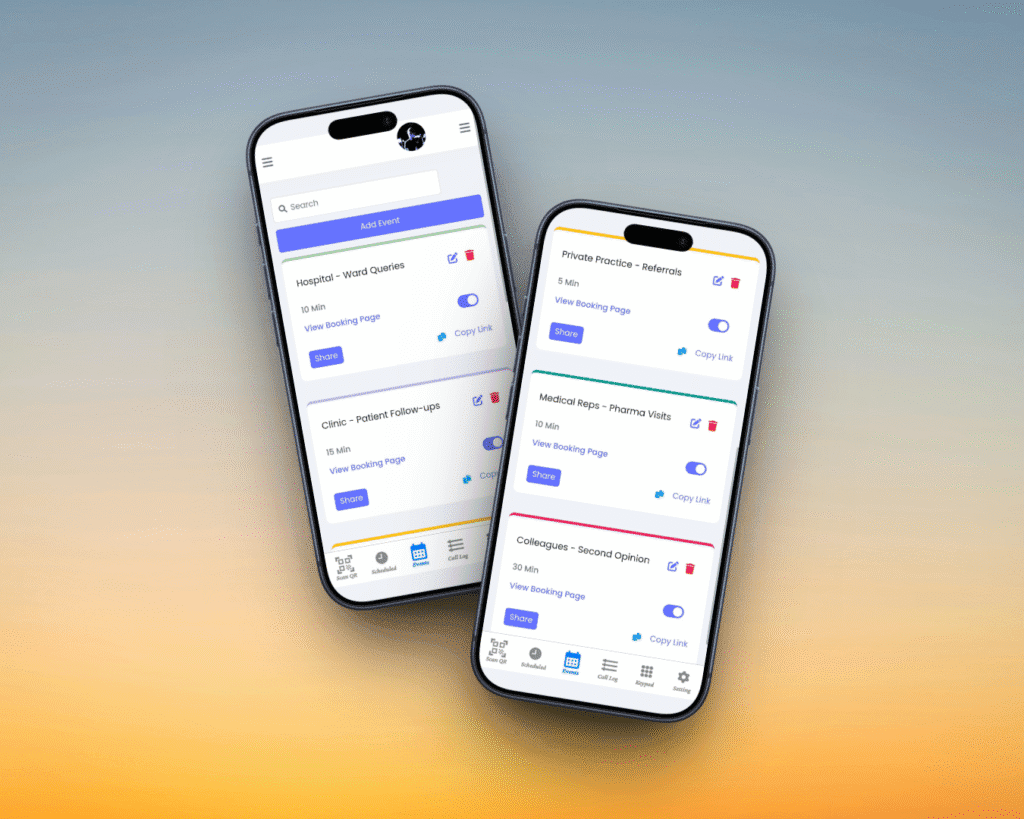
- “Hospital – Ward Queries” (for residents and ward nurses)
- “Clinic – Patient Follow-Up” (for post-OPD patients)
- “Private Practice – Referrals” (for referred and serious cases)
- “Medical Reps – Pharma Visits” (Pfizer, Sun Pharma, etc.)
- “Colleagues – Second Opinion” (for peer consultations)
LINK DESCRIPTIONS (what callers see when they request a slot):
- Patient name and brief complaint
- Name of referring doctor
- Medicine or product the rep is presenting
- Patient’s age group or condition category
Before a call even connects, you see who is calling and why. You are not answering blind. You are answering with full context, in the right schedule, from the right group.
Each link maps to its own schedule. Hospital queries come through during rounds time. Clinic follow-ups open after 7 PM. Reps get Friday evenings. Referrals get Saturday mornings.
One phone. Multiple roles. Zero confusion.
Problem 4 -The Nurse Cannot Manage What She Cannot Access
Your time is too valuable to also be your own receptionist.
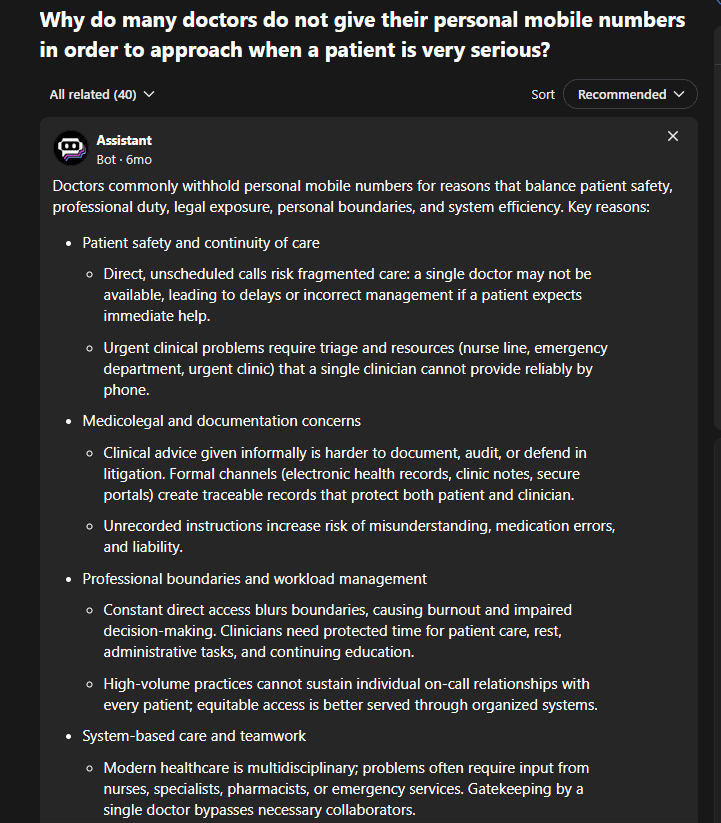
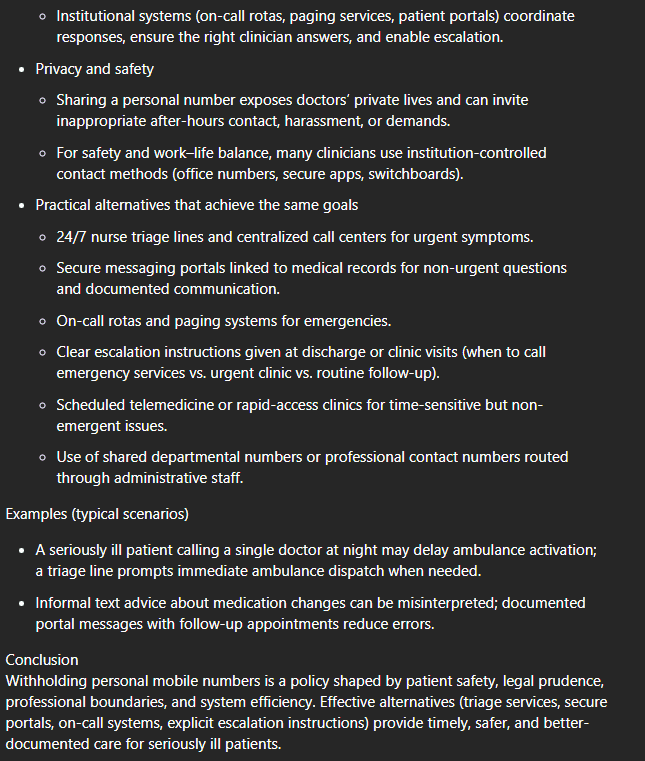
Most doctors rely on a nurse or clinic assistant to manage appointments and patient access. But the moment a patient has the doctor’s personal number, that system collapses. Patients bypass the nurse entirely and call the doctor directly. The nurse cannot screen calls she cannot intercept. The doctor becomes their own receptionist.
The question in that Quora thread has thousands of upvotes and no clean answer – because no tool has been built for this exact problem. Until now.
How Doctors Can Receive Patient Calls Without Sharing Personal Number – The Profile Number Switch
This is the most powerful feature in CallaLink for clinical use. It is also the one that makes the nurse-doctor call workflow function the way it was always supposed to.
Here is exactly how it works:
THE NURSE HOLDS THE PROFILE:
The nurse manages the CallaLink profile on behalf of the doctor. She creates links for different patient types, assigns descriptions, sets schedules, reviews call requests, and approves or declines bookings. Patients and medical reps interact with the system through her – they never have the doctor’s number.
THE PROFILE RUNS ON THE NURSE’S NUMBER BY DEFAULT:
The profile is registered under the nurse’s mobile number. All routine management runs through her. Patients who click the link and call connect to the nurse, who screens the purpose, handles bookings, and manages non-clinical queries.
THE NUMBER SWITCHES BEFORE THE DOCTOR’S CONSULTATION WINDOW:
When the doctor’s follow-up schedule opens – say, 7 PM to 9 PM – the nurse updates the profile number from her own to the doctor’s mobile. From that moment, every call coming through the approved schedule connects directly to the doctor’s phone as a normal GSM call.
Patients call the exact same link they always use. They have no idea the number behind it has changed. The call simply reaches the doctor.
THE NUMBER SWITCHES BACK WHEN THE WINDOW CLOSES:
At 9 PM, the nurse switches the profile number back to her own. Any call after that either hits the blocked schedule – or connects to the nurse during her available hours. The doctor’s phone goes completely silent. No calls. No interruptions. Total separation.
What this means in practice:
- Patients never have the doctor’s number at any point
- The nurse handles all routine screening and appointment management
- During the consultation window, calls reach the doctor directly without any extra step or app change
- After the window closes, the doctor is fully unreachable via CallaLink until the next scheduled session
The doctor gets undisturbed focus. The nurse gets a professional tool. Patients get a predictable, structured way to reach their doctor. Everyone in the system works better.
How Doctors Can Receive Patient Calls Without Sharing Personal Number – Complete Setup
Full setup takes under 15 minutes.
- Download CallaLink on Android or iOS.
- Register the profile under the nurse’s mobile number. This is the number that handles all calls outside the doctor’s consultation window.
- Create the private call link – callalink.com/drname. This goes on prescription slips, clinic notice boards, WhatsApp status, and anywhere patients currently find the doctor’s number.
- Create separate links for each caller group:
- Clinic Patient Follow-Up
- Hospital Ward – Residents and Nurses
- Medical Representatives (Pharma)
- Colleague Referrals
- Serious / Chairman-Referred Cases
- Add descriptions to each link so every call request includes context before it connects – patient name, complaint, referring doctor, or the product a medical rep is calling about.
- Assign each link to its own group and schedule.
- Medical reps: Friday 5 PM only.
- Post-clinic patients: weekday evenings 7-9 PM.
- Colleagues: weekday mornings only.
- Before the doctor’s consultation schedule opens, the nurse changes the profile number to the doctor’s mobile. All calls within that schedule now reach the doctor directly.
- When the schedule closes, the nurse changes the profile number back to her own. The doctor’s phone is silent until the next session.
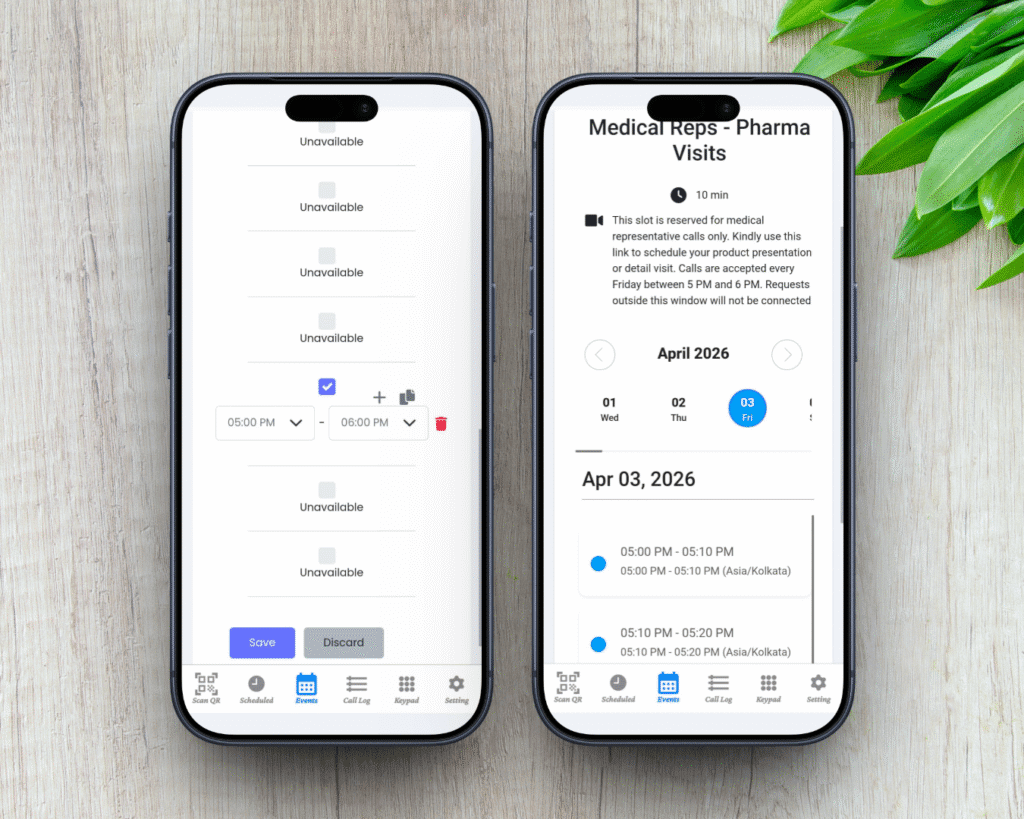
The doctor’s number is never shared with any patient, representative, or colleague at any stage of this workflow.
CallaLink vs the Alternatives – How Doctors Receive Patient Calls Privately
Most doctors who want to separate personal and patient calls try one of two things – a second SIM or WhatsApp Business. Here is why neither solves the actual problem of how doctors can receive patient calls without sharing personal number.
| Feature | CallaLink | WhatsApp Business | Second SIM |
| Personal number hidden | ✅ | ❌ | ❌ |
| Nurse manages profile | ✅ | ❌ | ❌ |
| Schedule-based call blocking | ✅ | ❌ | ❌ |
| Separate groups per caller type | ✅ | ✅ | ❌ |
| Caller describes purpose first | ✅ | ❌ | ❌ |
| Real GSM call quality | ✅ | VoIP Calls | ✅ |
| Auto-block outside schedule | ✅ | ❌ | ❌ |
| Profile number switch (nurse↔doctor) | ✅ | ❌ | ❌ |
| Link descriptions per caller | ✅ | ❌ | ❌ |
| Cost | $1/month | Free | SIM cost |
WhatsApp Business gives you a separate profile – but it is still a number. Patients message and call it whenever they want. There is no schedule, no screening, no structure. And as the Supreme Court of India ruled in 2025 when a doctor petitioned over a banned account – access to WhatsApp is not a fundamental right. Build your patient communication on a platform built for this, not one built for something else entirely.
A second SIM has the same problem in a different form. It is still a number that rings whenever someone decides to call. You cannot schedule it, group it, or switch it between a nurse and a doctor. You just carry a second phone.
CallaLink does not give you a second number. It gives you a link – and behind that link, a system. Patients book slots. Callers are grouped. Schedules run automatically. The nurse manages access. The doctor receives calls at the right time, from the right callers, and is completely unreachable outside those windows.
That is not a workaround. That is how clinical communication should have been built from the beginning.
Frequently Asked Questions
How can a doctor receive patient calls without sharing a personal number?
The most reliable answer to how doctors can receive patient calls without sharing personal number is a private call link on CallaLink – callalink.com/drname. Share this wherever your number currently appears: prescription slips, clinic boards, WhatsApp status. Your real number is never visible before, during, or after any call.
Can a nurse manage the doctor’s CallaLink profile on their behalf?
Yes. The profile is registered under the nurse’s mobile number by default. She manages all scheduling, call requests, approvals, and group assignments throughout the day. Before the doctor’s consultation window opens, she switches the profile number to the doctor’s mobile. After the window closes, she switches it back. The doctor receives calls only during that window and is completely unreachable outside it – without changing any app settings or carrying a second device.
What happens if a patient calls outside the scheduled hours?
CallaLink automatically blocks the call. The patient receives a message that the doctor is unavailable. The blocked attempt is shown in red caller popup- visible to the nurse for follow-up, but the doctor’s phone never rings. No manual intervention needed.
Can different patient types – OPD patients, hospital ward, medical reps – have completely different calling schedules?
Yes. You create separate links for each caller group, and each link carries its own schedule. A medical representative’s link, for example, can be set to open only on Friday evenings. A hospital ward nurse’s link can open only during morning rounds. Any call attempt outside that group’s window is automatically blocked – no intervention needed from the doctor.
Do patients need to download CallaLink to call the doctor?
Yes. Patients need to download CallaLink and use the link to submit a call request. Once approved – either by the doctor or the nurse – the call connects to the doctor’s phone as a real GSM call. Same quality as any normal mobile call.
Will patients see the doctor’s personal number after the call?
No. The real number is never shown to any caller at any point – before, during, or after the call. In CallaLink mode, call logs are also automatically cleared after each session. There is no way for a caller to retrieve the doctor’s number from their own call history.
How is this different from a second SIM or WhatsApp Business?
Both a second SIM and WhatsApp Business still give patients a direct number they can call at any time. Neither has scheduling, caller grouping, nurse-managed profiles, or auto-blocking. CallaLink gives you a link – not a number. No number to give out. No number to block. No second phone. The entire system runs on your existing mobile, with your real number invisible to every caller.
Managing calls with your personal number is a problem that extends beyond the clinic. If your number sits in an email signature, a prescription slip, or anywhere it can be forwarded – the same risk applies.
Read next: How to Receive Calls Without Sharing Your Phone Number
→ callalink.com/blog/receive-calls-without-sharing-your-phone-number
Read next: The Ultimate Guide to Phone Number Privacy – protecting your number across every context in daily life.
→ callalink.com/blog/phone-privacy-guide
How Doctors Can Receive Patient Calls Without Sharing Personal Number – Starting Today
One link. Every caller type. Full schedule control.
Your personal number stays yours – from the first prescription slip to the last consultation call.
Download on Android and iOS.